Undocumented feature –
how to configure weight for a rtpengine set (default value is 1):
modparam("rtpengine", "rtpengine_sock", "udp:localhost:12222=2")
http://lists.opensips.org/pipermail/users/2021-August/045084.html
Undocumented feature –
how to configure weight for a rtpengine set (default value is 1):
modparam("rtpengine", "rtpengine_sock", "udp:localhost:12222=2")
http://lists.opensips.org/pipermail/users/2021-August/045084.html
Found a very nice website https://openbsdrouterguide.net/
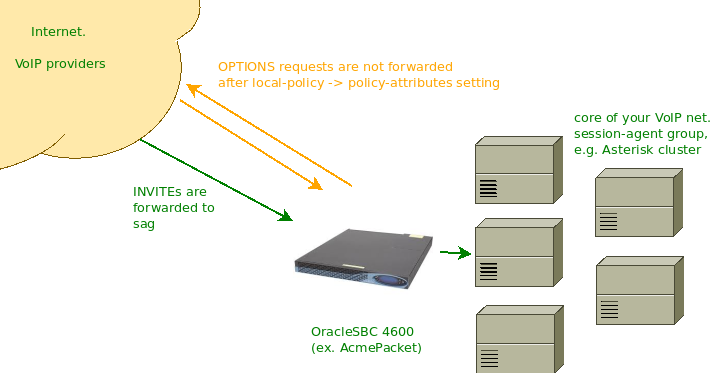
A quick howto with illustrations of what you need to do to prevent OPTIONS requests from being forwarded by your OracleSBC/AcmePacket from outside to the core of your VoIP network.
Just specify correct SIP methods in the policy-attributes of local-policy and add one more policy-attribute for OPTIONS.
Specifying ‘next-hop’ as ‘0.0.0.0’ will make SBC to reply 404.
Specifying ‘next-hop’ as ‘*’ will make SBC to reply 403.
Without these settings your SBC will forward OPTIONS sent by session-agents in the Internet (e.g. VoIP providers with which you configured SIP trunking) to your next-hops, usually this is your core network. Finally, such OPTIONS requests are answered not by SBC, but by your inner VoIP servers. These replies are not just undesirable, they also contain User-Agent header of your core equipment and the Contact header indicates their IP address.
You may also skip the creation of a separate policy-attribute for OPTIONS method, just leaving the one for every other methods you need (e.g. INVITE, PRACK, REFER, UPDATE). In this case your SBC will reply “480 No Routes Found”:
The blog moved to a new VPS.
The error I faced:
ERROR:core:tcp_init_listener: bind(32, 0x7f72fe4879ac, 16) on 11.22.33.44:443 : Permission denied ERROR:core:trans_init_all_listeners: failed to init listener [11.22.33.44], proto wss ERROR:core:main: failed to init all SIP listeners, aborting
The service could not start neither manually (opensips -f /path/to/cfg) nor via SystemD. The checking (opensips -C -f /path/to/cfg) of config file showed no errors.
Use ‘setcap’ command.
Example for OpenSIPS running as opensips:opensips.
How I fixed:
setcap CAP_NET_BIND_SERVICE=+eip /usr/sbin/opensips
No DB, node 1:
modparam("clusterer", "current_id", 1)
modparam("clusterer", "db_mode", 0)
modparam("clusterer", "seed_fallback_interval", 10) # Only relevant for seed node
modparam("clusterer", "current_info","cluster_id=1,url=bin:10.145.213.63:5555,flags=seed")
modparam("clusterer", "neighbor_info","cluster_id=1,node_id=2,url=bin:10.145.213.155:5555")
No DB, node 2:
modparam("clusterer", "current_id", 2)
modparam("clusterer", "db_mode", 0)
modparam("clusterer", "seed_fallback_interval", 10) # Only relevant for seed node
modparam("clusterer", "current_info", "cluster_id=1,url=bin:10.145.213.155:5555")
modparam("clusterer", "neighbor_info", "cluster_id=1,node_id=1,url=bin:10.145.213.63:5555")
DB configuration, node 1:
modparam("clusterer", "current_id", 1)
modparam("clusterer", "db_mode", 1)
modparam("clusterer", "db_url", "mysql://opensips:MeGaPaSs@10.145.213.200/opensips")
DB configuration, node 2:
modparam("clusterer", "current_id", 2)
modparam("clusterer", "db_mode", 1)
modparam("clusterer", "db_url", "mysql://opensips:MeGaPaSs@10.145.213.200/opensips")
Clusterer table:
MariaDB [dbsrv]> select * from clusterer\G
*************************** 1. row ***************************
id: 1
cluster_id: 1
node_id: 1
url: bin:10.145.213.63:5555
state: 1
no_ping_retries: 3
priority: 50
sip_addr:
flags: seed
description: USRLOC_Cluster_node_1
*************************** 2. row ***************************
id: 2
cluster_id: 1
node_id: 2
url: bin:10.145.213.155:5555
state: 1
no_ping_retries: 3
priority: 50
sip_addr:
flags:
description: USRLOC_Cluster_node_2
Just a link to a useful article about managing system resources according to a user/process:
https://www.digitalocean.com/community/tutorials/how-to-limit-resources-using-cgroups-on-centos-6
alexey@dell:~$ /opt/viber/Viber qt.qpa.plugin: Could not load the Qt platform plugin “xcb” in “” even though it was found. This application failed to start because no Qt platform plugin could be initialized. Reinstalling the application may fix this problem. Available platform plugins are: eglfs, linuxfb, minimal, minimalegl, offscreen, vnc, wayland-egl, wayland, wayland-xcomposite-egl, wayland-xcomposite-glx, webgl, xcb. Aborted (core dumped)
alexey@dell:~$ lsb_release -a
No LSB modules are available.
Distributor ID: Ubuntu
Description: Ubuntu 18.04.4 LTS
Release: 18.04
Codename: bionic
alexey@dell:~$ sudo apt install qt5dxcb-plugin
VERBOSE[90578][C-0027e6ee]: app_dial.c:935 in do_forward: \
[2019-11-25 09:54:06] \
-- Now forwarding SIP/2765-00559bac \
to 'Local/3135@office' (thanks to SIP/2559-00559bad)
NOTICE[90578][C-0027e6ee]: app_dial.c:958 in do_forward: \
Not accepting call completion offers from call-forward \
recipient Local/3135@office-0014b4ca;1
VERBOSE[109197][C-0027f144]: app_dial.c:935 in do_forward: \
[2019-11-25 12:20:26] \
-- Now forwarding SIP/1888-0055b018 \
to 'Local/7xxx3063600@office' (thanks to SIP/2813-0055b019)
NOTICE[109197][C-0027f144]: app_dial.c:958 in do_forward: \
Not accepting call completion offers from call-forward \
recipient Local/7xxx3063600@office-0014b7e3;1
“thanks to SIP/2559-00559bad” – this is a name of the channel who forwarded the call, either manually or by settings configured in the UAC.


