  _______                     ________        __
 |       |.-----.-----.-----.|  |  |  |.----.|  |_
 |   -   ||  _  |  -__|     ||  |  |  ||   _||   _|
 |_______||   __|_____|__|__||________||__|  |____|
          |__| W I R E L E S S   F R E E D O M
 -----------------------------------------------------
 OpenWrt 25.12.2, r32802-f505120278 Dave's Guitar
 -----------------------------------------------------

 OpenWrt recently switched to the "apk" package manager!

 OPKG Command           APK Equivalent      Description
 ------------------------------------------------------------------
 opkg install <pkg>     apk add <pkg>       Install a package
 opkg remove <pkg>      apk del <pkg>       Remove a package
 opkg upgrade           apk upgrade         Upgrade all packages
 opkg files <pkg>       apk info -L <pkg>   List package contents
 opkg list-installed    apk info            List installed packages
 opkg update            apk update          Update package lists
 opkg search <pkg>      apk search <pkg>    Search for packages
 ------------------------------------------------------------------

For more information visit:
https://openwrt.org/docs/guide-user/additional-software/opkg-to-apk-cheatsheet
OpenWRT: opkg to apk
June 16th, 2026tcpdump hourly
January 28th, 2026cron job:
# start tcpdump each hour from 8:00 to 20:00 daily
00 8-20 * * * root      /var/scripts/tcpdumper.sh
tcpdumper.sh script:
#!/bin/bash

TCPDUMP="/usr/bin/timeout 1h /usr/sbin/tcpdump -v -As0 -pnni enp2s0 udp and net 10.72.1.0/24 or net 10.72.2.0/24 or host 1.2.3.4"
DATE=$(date +%F_%T)

cd /home/user/
$TCPDUMP -w $DATE.pcap

# remove older than 5 days old dumps
find /home/user/ -type f -name "*pcap" -mtime +5 -execdir rm -f {} \;

exit $?OpenWRT: upgrade all packages
November 26th, 2025Mass upgrade of all packages is strongly discouraged and there is no any opkg command for upgrading all installed packages. But if you need it, run:
opkg list-upgradable | cut -f 1 -d ' ' | xargs -r opkg upgradeUbuntu: disabling IBus input method
September 30th, 2025Tried in Lubuntu 24.04.3 LTS, should work in all *buntu.
To disable:
sudo dpkg-divert --package im-config --rename /usr/bin/ibus-daemon
… and then reboot. To enable back:
sudo dpkg-divert --package im-config --rename --remove /usr/bin/ibus-daemonOpenSIPS: killing a plenty of dialogs manually
June 23rd, 2025This is almost the same as I’ve already posted.
The difference is that now we will kill dialogs not based by the remote side IP address, but based on datestart. There was some short-term connectivity interruption which caused a sudden increase in dialogs count. It’s normal for such a situation and they will end by the configured lifetime (‘default_timeout‘ parameter), e.g. 1 hour.
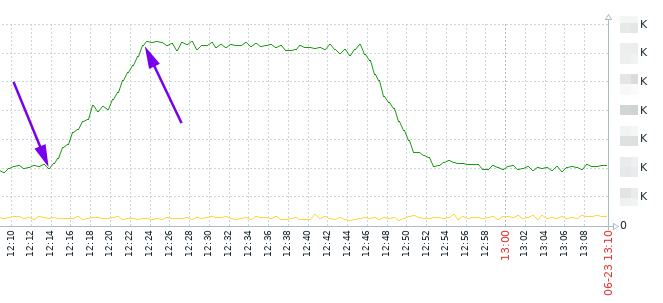
But what if we don’t want to wait and if we want to kill them manually?
The idea is to pick dialogs which were created during time range, assuming that you know an average call duration, and it’s obvious that if such calls are still shown by ‘opensips-cli -x mi dlg_list’ , it means that it is not valid alive call and you can kill it.
As it’s seen on the graph, the increasing was between 12:14 and 12:23. Let’s say it’s 12:30 now, and an average call duration is 30 … 60 seconds. So, we can kill dialogs which were created between 12:14 and 12:23 and which are still visible with ‘opensips-cli -x mi dlg_list’.
opensips-cli -x mi dlg_list > 2025-06-23_dlg_list.txtgrep datestart -B5 2025-06-23_dlg_list.txt | grep -B5 "2025-06-23 12:14:" | grep ID | awk '{ print $2}' | sed 's/"//g' | sed 's/,//g' > dlgs_12-14.txt
grep datestart -B5 2025-06-23_dlg_list.txt | grep -B5 "2025-06-23 12:15:" | grep ID | awk '{ print $2}' | sed 's/"//g' | sed 's/,//g' > dlgs_12-15.txt… and so on, up to 12:23. After that you’ll have several txt files with dialog IDs. Not it’s time to kill them:
for i in `echo $(cat dlgs_12-14.txt)` ; do opensips-cli -x mi dlg_end_dlg $i ; done… and the same for each file.
So, as a summary commands set we may use this one (just setting date/time you need):
# remove old files, if they are
rm -f dlgs_all.txt dlgs_to_kill.txt

# get all dialogs list
opensips-cli -x mi dlg_list > dlgs_all.txt

# just show the oldest dialog and the newest dialog
grep datestart dlgs_all.txt | sort | head -n1 ; echo ; grep datestart dlgs_all.txt | sort | tail -n1

# kill all dialogs started at e.g. 2025-08-21 15:0x
grep datestart -B5 dlgs_all.txt | grep -B5 "2025-08-21 15:0" | grep ID | awk '{ print $2}' | sed 's/"//g' | sed 's/,//g' > dlgs_to_kill.txt && for i in `echo $(cat dlgs_to_kill.txt)` ; do opensips-cli -x mi dlg_end_dlg $i ; done
SQL: sed-like replacement of a string
April 30th, 2025Imagine the situation: you have an SQL table with some string in some column. There is a plenty of such rows, and you want to replace this string in each row with some other string, something like in Bash – sed ‘s/green apple/blue apple/g’.
The original table looks like this.
Select:
SELECT "prefix", "description", "ruleid"
FROM "dr_rules"
WHERE "description" LIKE '%from ACME%'
ORDER BY "ruleid"
DESC LIMIT 5;
Result:
prefix	        description
73843444445	Novokuznetsk from ACME
73843208507	Novokuznetsk from ACME
73843400000	Maxim Novokuznetsk  from ACME
73843208505	Office Poehali Novokuznetsk  from ACME
73843208508	Office Maxim Novokuznetsk  from ACME
We want to change “from ACME” to “moved from ACME”.
First, let’s test our SQL statement with SELECT, no changes will be made:
SELECT REPLACE(description,'from ACME','moved from ACME')
FROM dr_rules
WHERE description LIKE('%from ACME%')
AND description NOT LIKE('%moved from ACME');
Now do an SQL UPDATE in a sed-like style:
UPDATE dr_rules
SET description=REPLACE(description,'from ACME','moved from ACME')
WHERE description LIKE('%from ACME%')
AND description NOT LIKE('%moved from ACME');
The result after an UPDATE:
prefix	        description
73843444445	Novokuznetsk moved from ACME
73843208507	Novokuznetsk moved from ACME
73843400000	Maxim Novokuznetsk  moved from ACME
73843208505	Office Poehali Novokuznetsk  moved from ACME
73843208508	Office Maxim Novokuznetsk  moved from ACME
So, to test the statement, do:
SELECT REPLACE(columnname,'old string','new string')
FROM tablename
WHERE columnname LIKE('%old string%')
AND columnname NOT LIKE('%new string');
To replace, do:
UPDATE tablename
SET columnname=REPLACE(columnname,'old string','new string')
WHERE columnname LIKE('%old string%')
AND columnname NOT LIKE('%new string');
If you need case-insensitive, use ILIKE instead of LIKE.
Asterisk: skip some action within timeout after a call
April 29th, 2025Let’s skip playing an annoying greeting for the caller, if he already called us withing the last 10 minutes.
Create a macro:
macro greetBlock( ext )
{
    if(${DB_EXISTS(greetblock/${CALLERID(num)})}) {
        // get the last call's timestamp.
        Set(LASTCALL=${DB(greetblock/${CALLERID(num)})});
    } else {
        Set(LASTCALL=0);
    }

    Set(NOW=${EPOCH});
    Set(DIFF=${MATH(${NOW} - ${LASTCALL},int)});

    if ("${LASTCALL}" != "" & ${DIFF} < 600) {
        // a person called less than 10 minutes ago - skip greeting.
        NoOp(skip greeting to ${CALLERID(num)} for ${ext});
        Set(GREETING=0);
    } else {
        Set(DB(greetblock/${CALLERID(num)})=${NOW});
        Set(GREETING=1);
    }

    return;
};
And use this macro in your dialplan:
73333123456 =>
{
  NoOp(${STRFTIME(,,%F %R)} . ${CALLERID(num)} dials SALES office . callid start: ${SIP_HEADER(Call-ID)});

  &greetBlock(${EXTEN});

  if ("${GREETING}" = "1") {
    goto greeton;
  } else {
    goto greetoff;
  }

  greeton:
    Playback(${SOUNDS}/welcome);

  greetoff:
    Queue(...);
    ...
}OpenSIPS: dialplan module usage examples
December 8th, 2024Use case 1:
convert the username consisting of letters in incoming INVITE from your VoIP provider to digits
(e.g. INVITE: rt_user1@192.168.1.203 -> INVITE: 13511654321@192.168.1.203, where country-city-subscriber is 1-3511-654321):
Add to your dialplan table:
INSERT INTO dialplan VALUES \
(1002,0,0,'rt_user1',1,'','13511654321',NULL,0,'modifying letters to digits in provider''s ruri');
So, the SQL record is as follows:
sqlite> select * from dialplan where dpid=1002;
         id = 2
       dpid = 1002
         pr = 0
   match_op = 0    # Matching operator for rule (0-equal, 1-regexp).
  match_exp = rt_user1
match_flags = 1
  subst_exp =
   repl_exp = 13511654321
    timerec =
   disabled = 0
      attrs = modifying letters to digits in provider's ruri